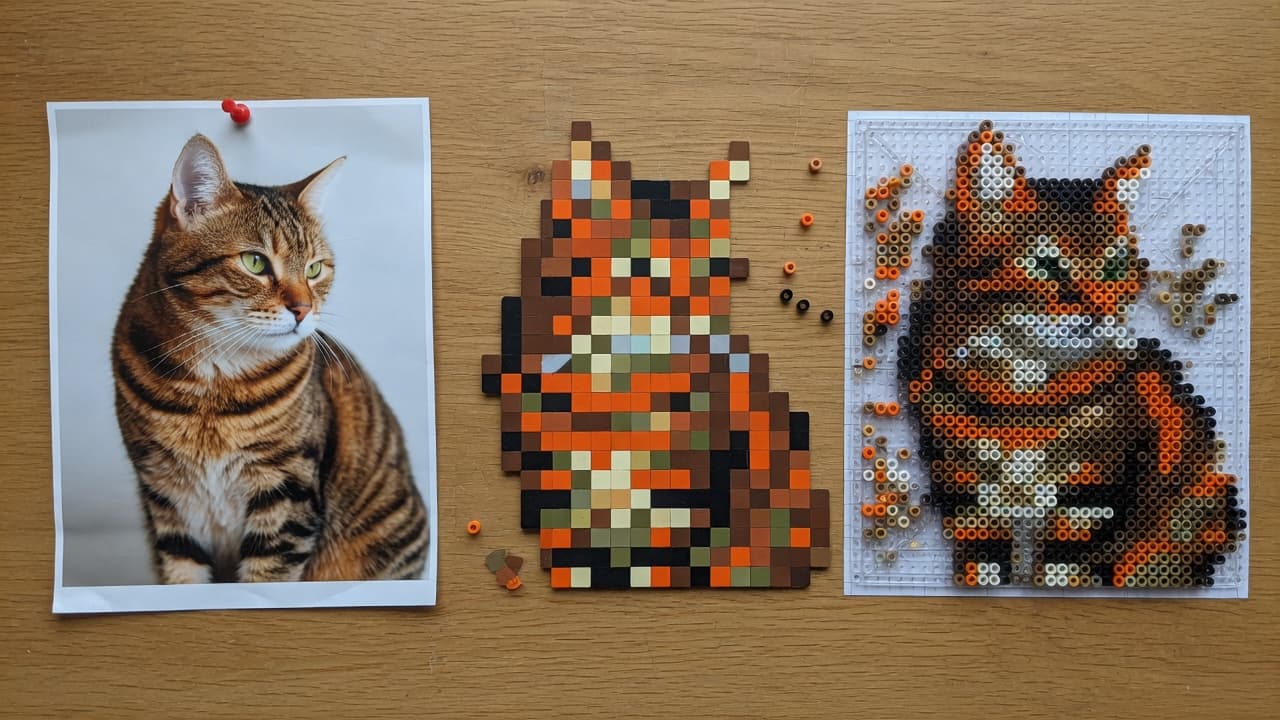
Photo to Pixel Art: Convert a Picture, Then Map It to Beads
Updated August 2026 · ~10 min

Quick Summary
A photo to pixel art step turns a continuous photograph into a grid of flat colors. That grid is useful on its own and it is the missing middle step for fuse beads: once cells are big and few, mapping each cell to a bead code is straightforward. This page covers how to convert a picture to pixel art without pretending a filter is a finished craft plan, then how to send that grid to a pegboard chart.
Two different jobs people mix up
Pixel art is a picture made of visible squares. A pixel art converter (or “picture to pixel art” tool) only has to reduce resolution and posterize color. It does not care whether those squares exist as plastic.
Bead mapping is the next job: each square must become a color that exists in a brand tray, with a count you can buy. If you stop at a pretty mosaic on screen, you still cannot shop.
Bead Pixel Art is built for the second job, but it includes the first. You crop a photo, force a board-sized grid, and limit colors. The preview is pixel art. The export is a bead chart. Images stay in the browser. It is not a full pixel-studio suite.

How to convert image to pixel art that still reads
- Start from a sharp original, not a tiny social-media download.
- Crop until one subject fills the frame.
- Choose the grid before the filter. For beads, pick a long edge that matches a pegboard (29 / 50 / 58 / 87 on many kits).
- Posterize hard. Eight to twenty colors usually beat eighty near-greens.
- Check silhouettes at arm’s length. If you cannot name the subject, recrop. Do not add more pixels first.
- Lock a dark outline if the subject is a character or a pet.
Fancy dithering looks clever on a monitor and looks like static on a pegboard.
Photo to pixel art vs photo to beads
| Step | Pixel-art only | Bead chart |
|---|---|---|
| Grid | Any (16, 32, 64…) | Must match a board you own |
| Colors | Any RGB | Must exist as a bead code |
| Empty space | Extra pixels are cheap | Extra beads cost time and money |
| Export | PNG mosaic | PNG + shopping list |
| Success test | Looks good at 200% zoom | Looks good from the sofa after ironing |
The Bead Pixel Art editor maps in one pass: photo → board grid → brand palette → list. For a longer photo case study, see Photo to bead pattern. For tool shopping criteria, see Free Perler bead pattern maker.
Settings that usually work
Pets and faces. Long edge 50 or 58. Background removed if it is a sofa or grass. Color cap near 12–24. Eyes need at least a two-cell highlight.
Logos you drew or own. Long edge 29–50. Two to eight colors. No dither.
Landscapes. Often a bad first bead project. Too many midtones. Crop to one object and treat the rest as empty.
Already-pixel source. You still set the board size. Upscaling a 16×16 drawing to 58 cells makes chunky blocks; that can look intentional.
Why converters look great and boards look muddy
Cameras capture gradients. Beads cannot. A converter that keeps 200 colors is showing off. Ironing also slightly blends neighboring cylinders, so single-cell sparkles disappear.
If the preview is gorgeous and the shopping list is 90 codes, you have a wallpaper, not a weekend project. Drop the cap until the list fits a drawer. Then fix the outline by painting cells. Cap first, paint second.
A short path in the browser
- Open the editor.
- Drop a photo. It is not uploaded to a convert API.
- Crop. Knock out a flat background if the tool offers it.
- Set long edge and max colors.
- Switch the palette to the brand in your closet.
- Toggle grid codes if you want to read the board while placing.
- Export PNG and the count list.
You now have both photo to pixel art (the preview) and a fuse-bead plan (the list). Same file, two uses.
FAQ
What is the best pixel art converter for a photo?
For wallpaper, any reducer that lets you set width and color count is enough. For beads, pick a converter that maps to a named bead palette and exports counts.
Can I convert a picture to pixel art on my phone?
Yes. A browser editor on a phone can crop and map. Fine cell painting is easier on a laptop or tablet. Check the privacy page if you care about uploads.
Is picture to pixel art the same as a bead pattern?
No. Pixel art is squares on a screen. A bead pattern assigns those squares to tray codes and a real pegboard size.
How many pixels wide should I go?
Match the board, not a power of two from game history. 29 / 50 / 58 / 87 are common hobby long edges.
Will Bead Pixel Art replace a pixel-art studio?
No. Those are drawing tools. This mapper is for photo-to-grid plus bead brands and a shopping list.
Conclusion
Photo to pixel art is a reduction: fewer cells, fewer colors, a silhouette you can still name. If the next step is plastic, run that reduction against a bead palette and a board size, then export a list.